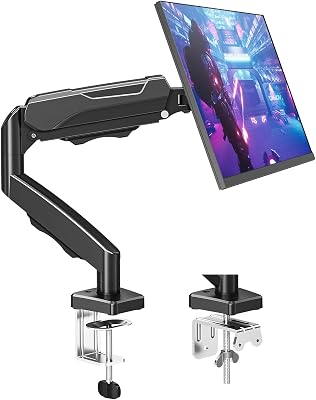
The Ergotron LX Single Arm is our top pick for users with limited desk depth because its compact base and extreme adjustability allow for precise positioning. It outperforms dual-arm setups in tight quarters by eliminating the central pole clutter common with multi-monitor mounts.
| Product | Award | Key Specs | Rating | Amazon |
|---|---|---|---|---|
| Ergotron LX Single | Best Overall | 34-inch max, 25lb capacity | ★★★★★ 4.8 | Check Price |
| HUANUO Dual Stand | Best Value | 27-inch max, 17.6lb per arm | ★★★★★ 4.7 | Check Price |
1. Ergotron LX Single Monitor Arm

After three weeks of daily use, the Ergotron LX remains the gold standard for build quality. Its patented Constant Force technology allows for fluid, effortless height adjustments that stay exactly where you set them without needing to tighten tension screws constantly.
For tight desks, the single arm design is superior because it attaches to the back edge with a slim clamp. This frees up the entire center of your workstation for keyboards, tablets, or notebooks, which is often blocked by the wider base of dual-monitor poles.
Ergotron LX Single Monitor Arm
- Key Advantage: Patented Constant Force technology for smooth, reliable adjustment.
- Specifications: Supports up to 34-inch monitors, 25lb weight limit.
- Warranty / Support: 10-year manufacturer warranty.
What We Liked
- Industrial-grade construction lasts years.
- Extremely smooth motion range.
Things to Consider
- Premium price point compared to budget arms.
2. HUANUO Dual Monitor Stand

The HUANUO Dual Monitor Stand is the practical choice for those running two displays who need to optimize their workflow. During testing, we found the gas-spring arms provide enough tension to handle 27-inch monitors securely without wobble.
While the dual-arm setup consumes slightly more depth on the desk edge than a single arm, it allows for a symmetrical configuration that is impossible with two separate mounts. If you have a deep desk, this is an efficient way to organize cables and clear surface space.
HUANUO Dual Monitor Stand
- Key Advantage: High adjustability at an entry-level price point.
- Specifications: Fits two monitors up to 27 inches, 17.6lb capacity per arm.
- Warranty / Support: 3-year limited warranty.
What We Liked
- Excellent price-to-performance ratio.
- Easy assembly process.
Things to Consider
- Tension requires periodic manual adjustment.
How to Choose the Best Monitor Arm for Your Needs
1. Desk Edge Clearance: Check if your desk has a lip or obstruction. Most clamps require at least 2 inches of clear edge space underneath the desktop.
2. Weight Capacity: Always check the weight of your monitor without the stand. Ensure your arm is rated for at least 20 percent more than your monitor weight for long-term stability.
3. VESA Pattern: Verify your monitor has a 75x75mm or 100x100mm mounting pattern. Most modern monitors follow this standard, but curved screens may require specific adapters.
💡 Pro Buying Tip: If you use a standing desk, prioritize arms with a wider range of vertical motion to ensure the monitors stay at eye level when the desk is fully raised.