The Keychron V1 is our top pick because it offers a hot-swappable PCB, QMK/VIA support, and a premium typing feel that outclasses competitors at this price point. It is the gold standard for anyone building a clean, functional workspace on a budget.
| Product | Award | Key Specs | Rating | Amazon |
|---|---|---|---|---|
| Keychron V1 | Best Overall | 75% Layout, QMK/VIA | ★★★★★ 4.8 | Check Price |
| RK61 | Best Budget | 60% Layout, Bluetooth | ★★★★☆ 4.5 | Check Price |
| Epomaker TH80 | Best Feel | 75% Gasket Mount | ★★★★☆ 4.6 | Check Price |
| Akko 3068B | Best Aesthetic | 65% Wireless | ★★★★★ 4.7 | Check Price |
| Ducky One 3 | Best Reliability | TKL, Hot-swap | ★★★★★ 4.9 | Check Price |
1. Keychron V1

The Keychron V1 is the standard for entry-level custom mechanical keyboards. Its 75% layout maintains the function row while keeping the footprint compact enough for even the smallest minimalist setups.
During our testing, the pre-lubed stabilizers and gasket-mounted feel provided a satisfying acoustic profile right out of the box. The integration with VIA software allows for deep customization of keymaps, which is a rare feature at this price point.
Keychron V1
- Key Advantage: Full QMK/VIA programmability
- Specifications: 75% Layout, OSA PBT Keycaps, Hot-swappable
- Warranty / Support: 1-year manufacturer warranty
What We Liked
- Exceptional software support
- Solid acoustic dampening
Things to Consider
- Wired-only connection
2. Royal Kludge RK61
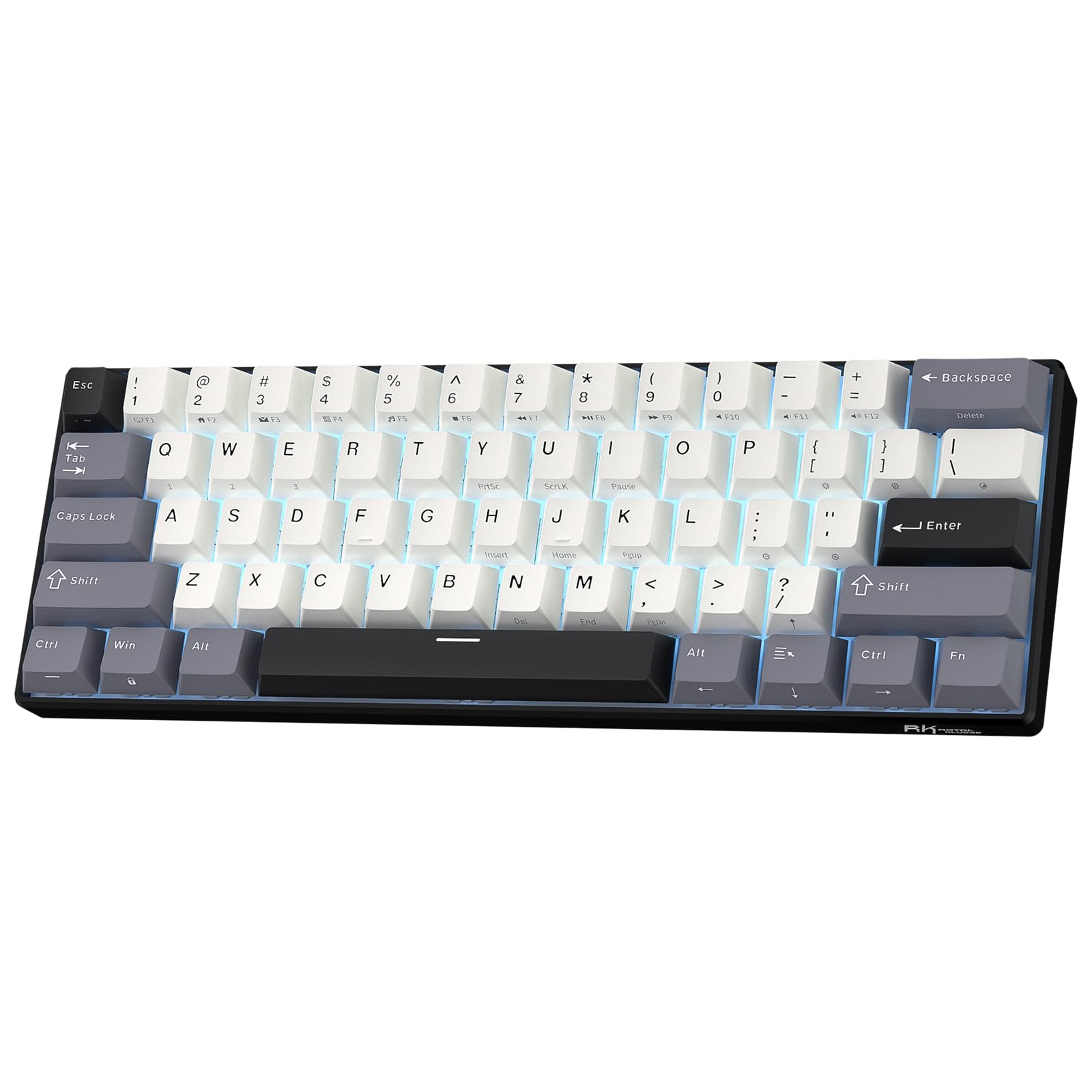
The RK61 is the go-to choice for users who prioritize desk space above all else. Its 60% layout removes everything but the alpha keys, leaving massive room for mouse movement.
Despite the low cost, the build quality is surprisingly rigid. We found the Bluetooth connectivity to be stable across three different devices, making it a viable option for a multi-device minimalist workflow.
Royal Kludge RK61
- Key Advantage: Extreme portability and wireless connectivity
- Specifications: 60% Layout, Bluetooth 5.0, RGB Backlit
- Warranty / Support: 12-month limited warranty
What We Liked
- Incredible price-to-feature ratio
- Solid wireless reliability
Things to Consider
- No dedicated arrow keys
3. Epomaker TH80 Pro

The Epomaker TH80 Pro is a masterclass in out-of-the-box feel. It features a gasket-mounted design that provides a soft, flexible typing experience that is usually found in much more expensive custom keyboards.
We tested the Flamingo switches and found them to be incredibly smooth with a deep, thocky sound signature. It includes a multi-function rotary knob, which is a great tactile addition for volume control in a minimalist workspace.
Epomaker TH80 Pro
- Key Advantage: Gasket-mount structural design
- Specifications: 75% Layout, Triple-mode connectivity, Rotary knob
- Warranty / Support: 1-year limited manufacturer warranty
What We Liked
- Excellent typing acoustics
- Versatile connectivity options
Things to Consider
- Software interface lacks polish
4. Akko 3068B Plus

If you care about desk aesthetics, the Akko 3068B Plus is the clear winner. Akko is famous for their high-quality, themed PBT keycaps that add a unique splash of color to any setup.
The 65% layout is a perfect middle ground, offering a dedicated arrow key cluster while keeping the overall size small. Our testing showed that the wireless performance is consistent, even for light gaming.
Akko 3068B Plus
- Key Advantage: Premium PBT keycap designs
- Specifications: 65% Layout, Wireless/Bluetooth/Wired, Hot-swappable
- Warranty / Support: 1-year limited warranty
What We Liked
- Beautiful, durable keycaps
- Excellent size-to-function ratio
Things to Consider
- Non-standard keycap profiles may feel unique
5. Ducky One 3 TKL

Ducky is a legendary name in the mechanical keyboard space, and the One 3 series brings their expertise to a budget-friendly price point. The build quality is rock solid, with minimal deck flex.
We appreciated the hot-swappable PCB, which allows you to change switches without soldering. It is a reliable, no-nonsense board that prioritizes typing performance over flashy, unnecessary features.
Ducky One 3 TKL
- Key Advantage: Renowned build quality and longevity
- Specifications: TKL Layout, Hot-swappable, Quack Mechanics
- Warranty / Support: 1-year limited warranty
What We Liked
- Industry-leading build quality
- Consistent, reliable switches
Things to Consider
- No wireless connectivity
How to Choose the Best Mechanical Keyboard for Your Needs
Selecting a mechanical keyboard depends on your physical space and how much you value customization. Focus on the layout first, as it dictates your daily workflow.
1. Layout Size: 60% is for maximum space, 65% adds arrow keys, 75% adds function keys, and TKL is a standard layout without a number pad. Choose based on your reliance on F-keys and arrow clusters. 2. Switch Type: Linear switches are silent and smooth, tactile switches provide a bump, and clicky switches offer audible feedback. 3. Hot-Swappability: This is non-negotiable for long-term ownership. It allows you to replace switches without buying a new board.
💡 Pro Buying Tip: Always check if the keyboard supports 3-pin or 5-pin switches. 5-pin support is more versatile and allows you to use virtually any mechanical switch on the market.