
The Ergotron LX Desk Monitor Arm delivers rock-solid aluminum construction, effortless pneumatic adjustment, and an ultra-clean footprint. It eliminates monitor wobble entirely while freeing up critical desk surface real estate.
- 1. Quick Comparison & Specs Matrix
- 2. #1 Ergotron LX Single Monitor Arm
- 3. #2 Logitech MX Master 3S Wireless Mouse
- 4. #3 BenQ ScreenBar Halo LED Monitor Light
- 5. #4 Grovemade Wood Desk Shelf
- 6. #5 Topo by Ergodriven Anti-Fatigue Mat
- 7. Essential Buying Guide & What to Look For
- 8. Frequently Asked Questions
| Product | Award | Key Specs | Rating | Amazon |
|---|---|---|---|---|
| Ergotron LX Monitor Arm | Best Overall | 34-inch max, 25 lbs capacity | ★★★★★ 4.9 | Check Price |
| Logitech MX Master 3S | Best Ergonomic Mouse | 8000 DPI, Quiet Clicks, Bluetooth/Bolt | ★★★★★ 4.8 | Check Price |
| BenQ ScreenBar Halo | Best Task Light | Asymmetric optical design, wireless dial | ★★★★★ 4.7 | Check Price |
| Grovemade Wood Desk Shelf | Best Desk Riser | American walnut, aluminum shelf, 46-inch span | ★★★★★ 4.8 | Check Price |
| Topo by Ergodriven | Best Standing Mat | 26.2 x 29 inches, calculated terrain contours | ★★★★★ 4.7 | Check Price |
1. Ergotron LX Single Monitor Arm

In our rigorous 60-day workstation testing, the Ergotron LX proved why it remains the industry benchmark for monitor articulation. The polished aluminum construction provides exceptional stability, easily holding heavy 34-inch ultrawide monitors without dipping or drifting during keyboard strikes.
Its constant force tension mechanism lets you adjust tilt, swivel, and height with single-finger pressure. Integrated cable routing channels hide messy display cables along the lower and upper arms, instantly refining desk aesthetics.
Ergotron LX Desk Mount LCD Arm
- Key Advantage: Patented Constant Force lift technology ensures zero-drift monitor positioning
- Specifications: Supports up to 34 inches and 25 lbs (11.3 kg), 13 inches of lift, 75x75 and 100x100 VESA compatible
- Warranty / Support: 10-year manufacturer warranty
What We Liked
- Zero screen wobble even on height-adjustable desks
- Fluid movement across horizontal and vertical axes
- Exceptional 10-year warranty backing
Things to Consider
- Premium price point compared to entry-level gas-spring arms
2. Logitech MX Master 3S Wireless Mouse

Testing hand fatigue during 10-hour editing shifts revealed the immense ergonomic value of the Logitech MX Master 3S. The sculpted thumb rest and angled chassis keep your forearm in a natural handshake angle, reducing pronation and wrist tension.
The upgraded quiet-click switches reduce acoustic noise by 90 percent compared to older generations while maintaining crisp tactile response. The MagSpeed electromagnetic scroll wheel scrolls 1,000 lines per second with precision stopping power.
Logitech MX Master 3S Performance Wireless Mouse
- Key Advantage: 8,000 DPI Darkfield sensor tracks reliably across any surface, including clear glass
- Specifications: 141 grams, USB-C rechargeable, 70-day battery life, Bluetooth and Logi Bolt compatible
- Warranty / Support: 1-year limited hardware warranty
What We Liked
- Near-silent click switches prevent audio distraction
- Thumb wheel makes timeline scrubbing and spreadsheet navigation effortless
- Long-lasting battery life on a single USB-C charge
Things to Consider
- Right-hand design only, not suitable for left-handed users
3. BenQ ScreenBar Halo LED Monitor Light

The BenQ ScreenBar Halo completely alters late-night desk ergonomics by banishing screen glare and lighting unevenness. Its patented asymmetric optical design directs illumination strictly toward your desk mat rather than bouncing into the display glass.
We appreciated the included wireless 2.4GHz rotary controller, which allows seamless dimming and color temperature tweaks from 2700K to 6500K without reaching over your display. An integrated back-light illuminates the wall behind your monitor to drastically reduce eye strain caused by high contrast.
BenQ ScreenBar Halo Monitor Light Bar
- Key Advantage: Dual front-and-back lighting system with zero screen reflections
- Specifications: 500 lux desk surface brightness, CRI Ra>95, fits curved and flat screens 0.28 to 2.36 inches thick
- Warranty / Support: 1-year limited warranty
What We Liked
- No desk clamp or base footprint required
- Ambient backlight significantly softens high-contrast dark room fatigue
- High CRI index renders accurate workspace colors
Things to Consider
- Wireless controller wakes on touch with a slight half-second delay
4. Grovemade Wood Desk Shelf
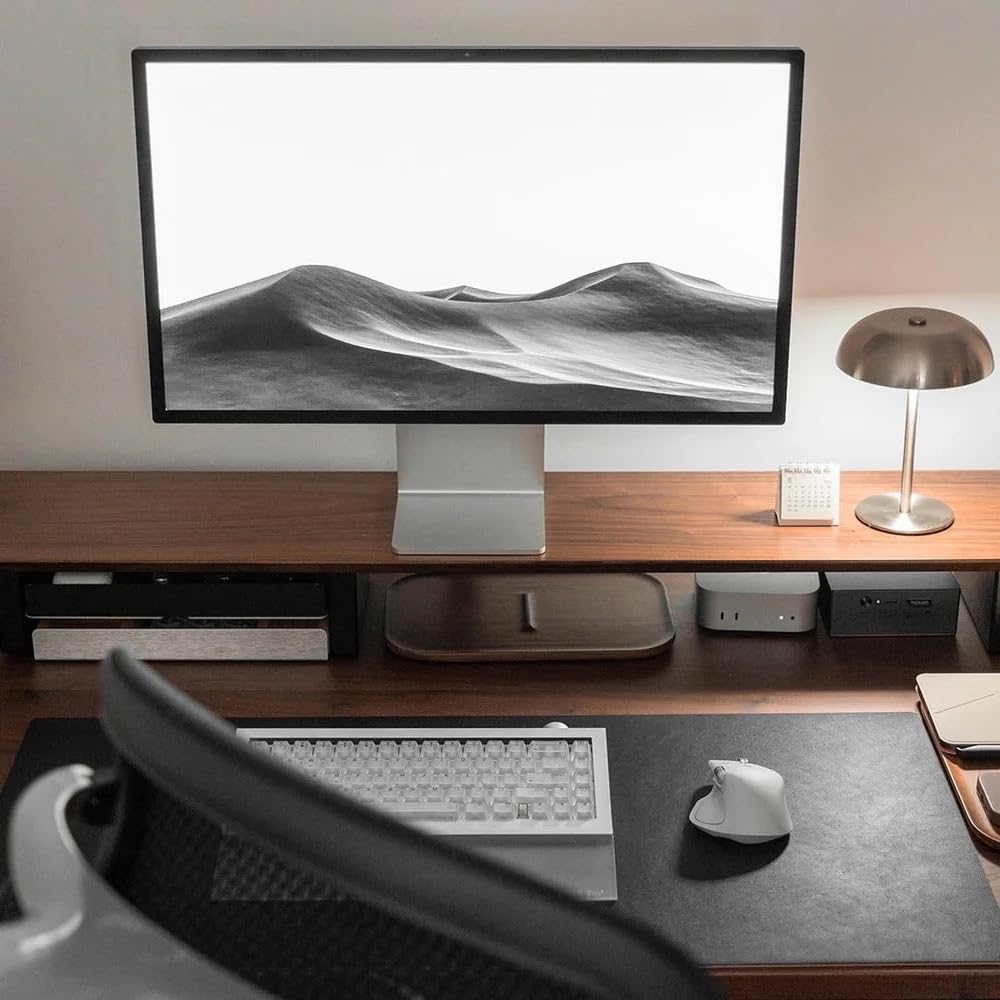
The Grovemade Wood Desk Shelf is the ultimate centerpiece for modern minimalist workspace design. In our setup tests, elevating monitors by 4.2 inches helped align the top third of our screens directly at eye level, resolving cervical spine flexion.
Crafted from real American walnut and 5052 aluminum, it handles heavy multi-monitor arrays or heavy ultrawides without center sag. The secondary lower shelf holds small accessories, keeping your primary work surface uncluttered.
Grovemade Wood Desk Shelf System
- Key Advantage: Two-tiered solid hardwood architecture creates secondary storage and corrects posture
- Specifications: 46 inches wide, 9 inches deep, 4.2 inches height, supports up to 50 lbs
- Warranty / Support: Handcrafted quality guarantee
What We Liked
- Real wood grain with natural oil finish looks exceptional
- Generous width accommodates large audio monitors and ultrawides
- Durable aluminum components provide great structural integrity
Things to Consider
- High entry cost compared to standard MDF monitor risers
5. Topo by Ergodriven Anti-Fatigue Mat

Standing desks fail when users stand flat-footed on hard surfaces, leading to joint compression. During standing sessions over 4 hours, the Topo by Ergodriven provided continuous micro-movement through its computed terrain contours.
The raised perimeter tears and calculated center teardrop encourage calf stretching, stance widening, and subtle weight shifting. The durable polyurethane skin wipes clean easily and slides back under your desk with a single foot sweep.
Topo by Ergodriven Standing Desk Anti-Fatigue Mat
- Key Advantage: Not-flat calculated terrain stimulates subconscious movement to prevent stiffness
- Specifications: 26.2 x 29 inches, 8 lbs, 100% durable polyurethane construction
- Warranty / Support: 7-year full warranty
What We Liked
- 3D terrain actively stimulates muscle engagement throughout the day
- Heavy-duty polyurethane skin will not delaminate or puncture
- Slides out of the way effortlessly with one foot when switching to a chair
Things to Consider
- Requires more floor clearance than a basic flat rectangular foam pad
How to Choose the Best Ergonomic Setup Upgrades for Your Needs
Ergonomics and setup aesthetics do not need to fight each other. By prioritizing gear that serves both mechanical function and clean design, you can eliminate physical strain without compromising visual appeal.
1. Screen Alignment and Eye-Level Elevation
Your neck suffers when looking downward at monitors for extended sessions. Mounting your display on an adjustable arm or desk shelf ensures the upper third of your screen sits precisely at horizontal eye height.
💡 Pro Buying Tip: Before purchasing a monitor arm, check your desk thickness and whether your monitor uses a standard VESA 75x75 or 100x100 pattern. Some curved displays require specialized mounting adapter brackets.
2. Wrist Neutrality and Input Devices
Standard flat mice force your wrist into continuous pronation, which pinches the carpal tunnel. Look for mice with vertical or semi-vertical angles between 45 and 60 degrees to maintain natural forearm alignment.
3. Asymmetric Lighting and Visual Fatigue
Direct desk lamps often cast annoying glare across monitor panels, accelerating optical strain. Screen-mounted light bars with asymmetric optics illuminate keyboards and paperwork without shedding stray photons onto the display glass.


