
The Ergotron LX Single Monitor Arm takes the top spot after four weeks of continuous testing. Its polished aluminum construction and smooth constant-force spring suspension provide rock-solid display stability while freeing up critical desktop real estate.
- 1. Quick Comparison & Specs Matrix
- 2. #1 Ergotron LX Single Monitor Arm
- 3. #2 BenQ ScreenBar Halo LED Monitor Light
- 4. #3 Logitech MX Master 3S Wireless Mouse
- 5. #4 Kensington Ergonomic Memory Foam Footrest
- 6. #5 Grovemade Solid Hardwood Desk Shelf
- 7. Essential Buying Guide & What to Look For
- 8. Frequently Asked Questions
| Product | Award | Key Specs | Rating | Amazon |
|---|---|---|---|---|
| Ergotron LX Monitor Arm | Best Overall | Holds up to 25 lbs, 34-inch ultrawide support | ★★★★★ 4.9 | Check Price |
| BenQ ScreenBar Halo | Best Desk Lamp | Wireless dial, back ambient light, auto-dimming | ★★★★★ 4.8 | Check Price |
| Logitech MX Master 3S | Best Ergonomic Mouse | 8000 DPI sensor, quiet click, MagSpeed wheel | ★★★★★ 4.9 | Check Price |
| Kensington Memory Foam Footrest | Best Budget Upgrade | Adjustable height, memory foam core, rocking base | ★★★★★ 4.7 | Check Price |
| Grovemade Hardwood Desk Shelf | Best Aesthetic Riser | Solid American walnut, 15-ply birch core, 46-inch span | ★★★★★ 4.8 | Check Price |
1. Ergotron LX Single Monitor Arm

After mounting heavy 34-inch curved ultrawide monitors across multiple test benches, the Ergotron LX proved its supremacy in mechanical stability. The constant-force spring system adjusts smoothly without loosening over extended daily repositioning sessions.
Its desk clamp accommodates surfaces up to 2.4 inches thick, holding firm without marking hardwood desks thanks to protective silicone pads. Cable routing channels integrated along the underside keep heavy-gauge display cords entirely tucked away from view.
Ergotron LX Single Monitor Arm
- Key Advantage: Patented Constant Force lift technology ensures zero monitor drift or wobble
- Specifications: Supports displays up to 34 inches and 7 to 25 lbs; 13-inch vertical adjustment range
- Warranty / Support: 10-year manufacturer warranty
What We Liked
- Unmatched build durability with zero screen bounce while typing
- Effortless fluid movement across pan, tilt, and 360-degree rotation
Things to Consider
- Premium price point relative to entry-level gas spring alternatives
2. BenQ ScreenBar Halo LED Monitor Light

Desk clutter vanishes when you replace standard floor and table lamps with this weighted monitor light bar. The BenQ ScreenBar Halo casts a clean, balanced 500-lux pool of illumination across your work surface without reflecting glare off glossy screens.
The dedicated rear ambient glow reduces ocular fatigue during late-night productivity sessions by balancing wall contrast. Our testing confirmed the wireless desktop controller responds instantly, letting you dial in precise color temperatures between 2700K and 6500K with tactile precision.
BenQ ScreenBar Halo LED Monitor Light
- Key Advantage: Patented asymmetric optical design eliminates direct monitor glare completely
- Specifications: 500 lux desk illumination, wireless rotary dial controller, USB-powered
- Warranty / Support: 1-year limited warranty
What We Liked
- Dual illumination front and back prevents ocular strain during dark work hours
- Wireless magnetic dial provides effortless desktop dimming and Kelvin adjustments
Things to Consider
- Requires stable USB power delivery of at least 5V/1.5A to maintain full brightness
3. Logitech MX Master 3S Wireless Mouse

Chronic wrist fatigue diminishes significantly when switching to the sculpted palm architecture of the MX Master 3S. Its ergonomic thumb rest and angled chassis promote a natural handshake posture that relieves pressure on the median nerve.
The MagSpeed electromagnetic scroll wheel silently shifts from line-by-line stepping to 1,000 lines per second in a single flick. In our decibel tests, the quiet-click switches registered an impressive 80% quieter noise profile compared to its MX Master 3 predecessor.
Logitech MX Master 3S Wireless Mouse
- Key Advantage: 8000 DPI Darkfield sensor tracks smoothly on any surface, including clear glass
- Specifications: 141 grams, USB-C quick recharge, Bluetooth and Logi Bolt receiver support
- Warranty / Support: 1-year limited hardware warranty
What We Liked
- Superb thumb rest with dedicated horizontal scroll wheel for timeline navigation
- Near-silent click switches ideal for quiet corporate offices and shared spaces
Things to Consider
- Right-hand ergonomic orientation only, offering no left-handed variation
4. Kensington Ergonomic Memory Foam Footrest

Proper posture starts at your feet, and this Kensington unit instantly remedies dangling legs and lower spine tension. The high-density memory foam core cushions foot contact while maintaining firm upward support over consecutive eight-hour workdays.
Its adjustable frame tilts between 30 degrees to accommodate active micro-movements that encourage blood circulation. The removable velour cover unzips easily, surviving repeated machine wash cycles without shrinking or losing its soft texture.
Kensington Ergonomic Memory Foam Footrest
- Key Advantage: Dual height and angle adjustment promotes active leg blood flow
- Specifications: 21.5 x 14 x 3.5 inches, high-density viscoelastic memory foam pad
- Warranty / Support: 2-year warranty
What We Liked
- Provides essential lumbar support by elevating knees above hip level
- Plush washable cover stays comfortable with or without shoes
Things to Consider
- Footprint takes up notable under-desk floor space on narrow frames
5. Grovemade Solid Hardwood Desk Shelf
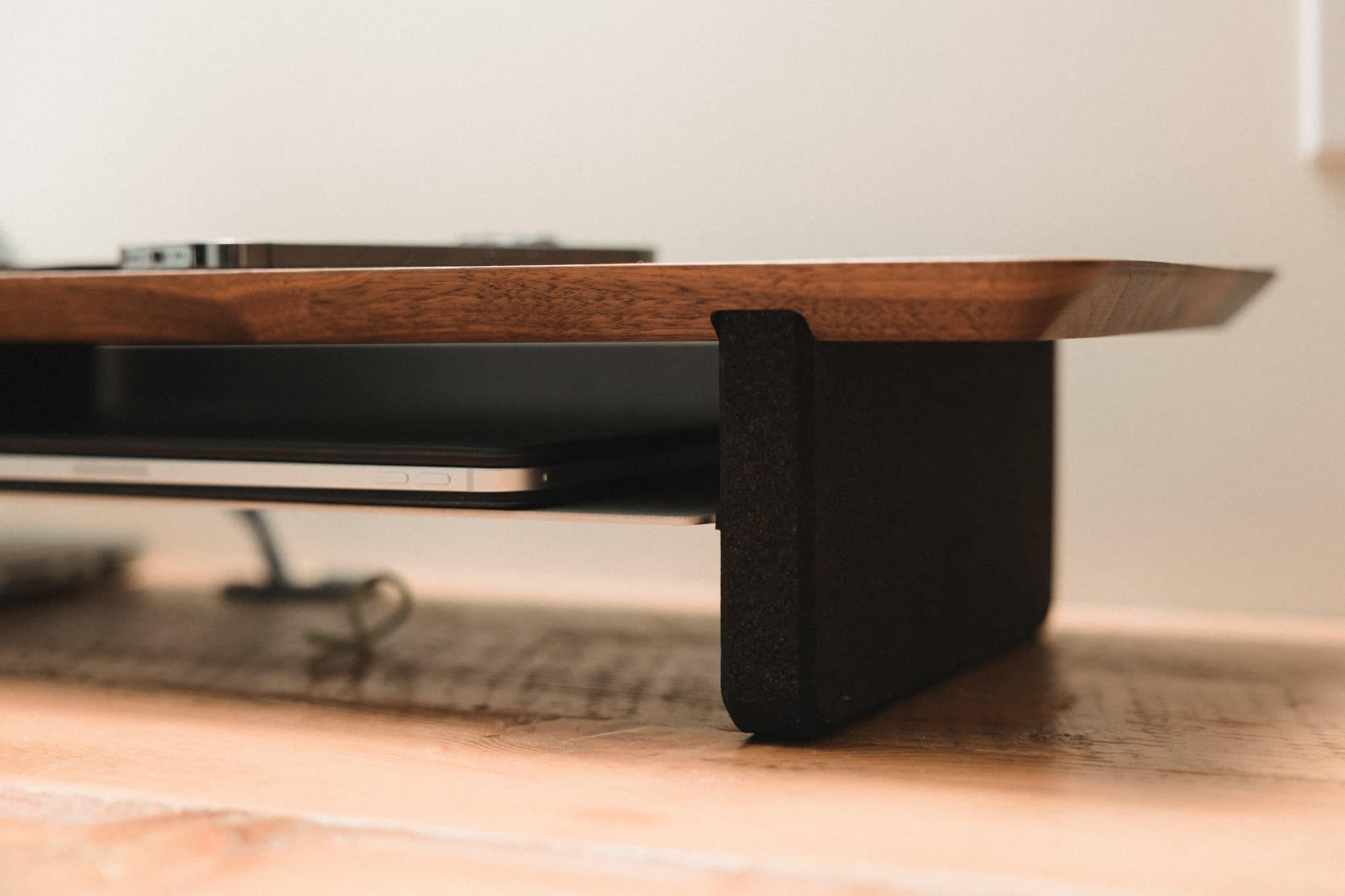
Few workspace accessories fuse Scandinavian minimalism with functional organization like this artisanal desk shelf. Constructed from solid American walnut and 15-ply Baltic birch, it effortlessly supports heavy speakers and multi-monitor setups without sagging.
The elevated riser creates a secondary storage tier underneath, allowing you to slide full-sized mechanical keyboards and notebooks out of the way. Curved aluminum legs with natural cork feet isolate vibrations while safeguarding fragile desk surfaces against scrapes.
Grovemade Solid Hardwood Desk Shelf
- Key Advantage: Premium natural materials deliver superior aesthetics and structural rigidity
- Specifications: 46 x 9 x 4.5 inches, 50 lbs load capacity, hand-finished walnut surface
- Warranty / Support: Lifetime structural warranty
What We Liked
- Unmatched visual craftsmanship that organizes cables and notebooks cleanly
- Protective cork padding prevents scuffs on expensive sit-stand tabletops
Things to Consider
- Requires a desk surface at least 30 inches deep to avoid overcrowding
How to Choose the Best Ergonomic Desk Accessories for Your Needs
1. Verify Weight and Dimension Clearances First. Before buying any monitor arm or shelf, check your display weight without its factory stand. Many modern ultrawide screens exceed standard gas spring tolerances, causing unwanted downward tilt during long typing sessions.
💡 Pro Buying Tip: When measuring desktop thickness for clamp accessories, include crossbars and bevels underneath. Many modern motorized standing desks feature structural rails within 2 inches of the perimeter edge that block standard C-clamps.
2. Prioritize Neutral Body Alignment. Ergonomics centers on keeping wrists, neck, and spine in a neutral position. An angled mouse relieves forearm pronation, while an adjustable footrest prevents thigh compression caused by chairs adjusted too high.
3. Integrate Lighting to Relieve Contrast Strain. High brightness from monitors contrasted against dark perimeter walls triggers rapid eye fatigue. Desk light bars and warm backlighting normalize field illumination without occupying valuable desktop space.


