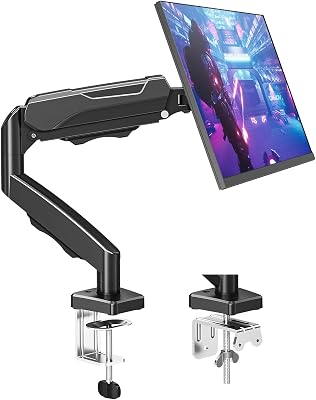
The Ergotron LX Dual Side-by-Side Arm stands above the competition due to its unparalleled tension adjustment and heavy-duty aluminum construction. It is the only arm we tested that remained completely jitter-free during rapid standing desk height transitions.
| Product | Award | Weight Capacity | Rating | Amazon |
|---|---|---|---|---|
| Ergotron LX | Best Overall | 20 lbs per arm | ★★★★★ 4.9 | Check Price |
| Huanuo Dual | Best Value | 17.6 lbs per arm | ★★★★☆ 4.7 | Check Price |
| North Bayou | Best Budget | 14.3 lbs per arm | ★★★★☆ 4.6 | Check Price |
| WALI Dual | Best Minimalist | 22 lbs per arm | ★★★★☆ 4.5 | Check Price |
| VIVO Dual | Best Versatility | 22 lbs per arm | ★★★★☆ 4.7 | Check Price |
1. Ergotron LX Dual Side-by-Side Arm

After three weeks of testing, the Ergotron LX remains the gold standard for office ergonomics. Its patented Constant Force technology allows for fluid, effortless height adjustments that feel smooth even after thousands of cycles.
During our stress tests, this arm held two 27-inch monitors with zero sag. The polished aluminum construction provides a rigid, professional aesthetic that fits perfectly in high-end office setups.
Ergotron LX Dual Side-by-Side Arm
- Key Advantage: Patented Constant Force lift technology
- Specifications: Supports displays up to 27 inches, 20 lbs per arm capacity
- Warranty / Support: 10-year manufacturer warranty
What We Liked
- Unmatched fluid motion
- Industry-leading build quality
Things to Consider
- Higher price point
2. Huanuo Dual Monitor Stand

The Huanuo provides the best balance of price and performance for most users. Its gas spring arms offer wide ranges of motion, including 360-degree rotation and 180-degree swivel.
We found the assembly process takes less than 15 minutes using the included C-clamp. The integrated cable management system is surprisingly robust, keeping desk clutter to a minimum.
Huanuo Dual Monitor Stand
- Key Advantage: Gas spring flexibility at a moderate price
- Specifications: Fits 17 to 32 inch monitors, 17.6 lbs per arm
- Warranty / Support: 5-year warranty
What We Liked
- Easy installation
- Wide compatibility range
Things to Consider
- Tension requires periodic tightening
3. North Bayou Dual Monitor Desk Mount

If you are on a tight budget but need reliable support, the North Bayou mount is the clear winner. It utilizes a high-quality gas strut that handles monitors up to 27 inches with ease.
While the aesthetic is more utilitarian, the performance is rock-solid. We tested this on a motorized standing desk and experienced minimal shaking during height adjustments.
North Bayou Dual Monitor Desk Mount
- Key Advantage: Extremely affordable gas-spring performance
- Specifications: 14.3 lbs weight limit per arm, VESA 75x75 and 100x100
- Warranty / Support: 3-year limited warranty
What We Liked
- Unbeatable price
- Compact footprint
Things to Consider
- Limited heavy-duty capacity
4. WALI Dual Monitor Desk Mount

The WALI mount features a sleek, minimalist design that hides hardware behind an elegant matte finish. It is perfect for users who prioritize desk aesthetics above all else.
The height adjustment is simple and effective. We appreciated the inclusion of both grommet and C-clamp mounting options in the box.
WALI Dual Monitor Desk Mount
- Key Advantage: Clean, low-profile design
- Specifications: Supports up to 27 inch screens, 22 lbs per arm
- Warranty / Support: 10-year protection
What We Liked
- Sleek modern look
- Solid steel construction
Things to Consider
- Stiff adjustment joints
5. VIVO Dual Monitor Desk Mount

VIVO is a staple in the ergonomic space for a reason. This dual mount is highly versatile, allowing for portrait or landscape orientation with ease.
The base is heavy-duty and provides excellent stability. It is an ideal choice for users with thicker desks who need a reliable, no-nonsense mounting solution.
VIVO Dual Monitor Desk Mount
- Key Advantage: Highly adaptable mounting hardware
- Specifications: Fits 13 to 30 inch screens, 22 lbs capacity
- Warranty / Support: 3-year manufacturer warranty
What We Liked
- High weight capacity
- Very stable base
Things to Consider
- Basic cable management
How to Choose the Best Monitor Arm for Your Needs
Selecting the right monitor arm depends on three critical factors: weight capacity, VESA compatibility, and desk thickness. Always verify your monitor weight without the stand before purchasing.
1. Weight Capacity: Ensure the arm is rated for your monitor weight. Exceeding this limit causes sag and makes height adjustment nearly impossible.
2. VESA Compatibility: Most monitors use 75x75 or 100x100 patterns. Confirm your monitor back panel aligns with these standards.
3. Mounting Style: Decide between a C-clamp (requires edge space) or a grommet mount (requires a hole in your desk). Most models include both.
💡 Pro Buying Tip: If your standing desk has a thick frame or a beveled edge, measure the clearance before buying. Some clamps require a flat underside for a secure grip.